How it started
I wanted to build a Raycast extension. I didn’t have a useful idea, so I built a game.
One of the key features of Raycast is its extension store, misleadingly named because everything on it is free. Some of my favorite extensions let me grab an icon or SVG, manage GitHub PRs, or join a meeting with one click. After using those tools and hanging around the community, I wanted to try making one myself.
So of course, I did the obvious thing: built a game inside my productivity tool.
Turning Tools Into Games
The idea I ended up with was an incremental clicker game, a genre known mainly for being a time waster. While this may not be a “useful” extension, it ticked all the boxes for a good challenge:
- Test local storage
- Figure out offline progress
- Build a fun game UI
- Work through game flow and updates
I also didn’t realize at the time that it would be a perfect way to learn how to update extensions, thanks to the unavoidable bugs found by early players.
So I started writing a design doc, since I didn’t know quite how to escape Raycast’s constraints or plan out solid game progression.
Finding the game vibe and testing limitations
Inevitable scope creep kicked in, and the project expanded from a clicker to a full blown idle game with achievements and a prestige system. I even dreamed of a side-by-side panel (Cookie Clicker style).
Naive. While Raycast uses React, it imposes strict limits to keep everything tidy. Raycast killed my side-by-side panel because it only renders one column. I spent a weekend trying to hack a fake sidebar with ASCII art. It looked like a spreadsheet from hell.
My first mistake was prototyping the MVP in the browser. I thought this would help me iterate quickly before turning it into an extension.
Instead, it caused headaches and unnecessary PR problems, all of my own making. I ended up with legacy HTML and extra code debt to clean before finalizing the extension.
Finally Creating
Raycast extensions are React and TypeScript with one extra API. If you’ve done web dev, you already know most of it.
So I started scaffolding in web, since that’s what I knew. This kind of worked, but also created way too much code debt for such a small project.
Once I gave in and built in Raycast, for Raycast, the UI constraints stopped being obstacles. They just forced clarity. Resources, upgrades, and flags live in LocalStorage, with a saveVersion key to keep migrations safe. Offline progress works by logging a timestamp on close and applying capped idle gains when you reopen the extension. There is one main Game command where you play, plus a Menu Bar Command that keeps ticking in the background. Updates meant defensive save migrations and small, reviewable PRs.
// Example save structure
type SaveState = {
  resources: number;
  upgrades: string[];
  saveVersion: string;
};

const saveVersion = "1.0.0";
await LocalStorage.setItem("save", JSON.stringify({ resources, upgrades, saveVersion }));
Making the game fun
Once I had the skeleton, I realized I wasn’t having any fun playing or testing it. Which kind of defeats the point of a game. So since this was a learning project, I did what I thought would actually be fun.
Breaking the balance
It’s always baffled me when a developer nerfs parts of their PvE game in the name of balance. Since I wasn’t trying to milk playtime and was mainly in this to learn, I optimized for fun, not balance.
First obvious break: if you hold down the clicker instead of clicking, it acts as an auto clicker. My solution? Add an achievement for it. Everyone who plays these games uses an auto clicker anyway, so why not turn it into an Easter egg?
Other fun decisions followed: scaling that goes wild but stays rewarding, pacing that doesn’t steal your entire day, and an optimistic trust in the player’s system clock. Yes, time skipping works just like the old mobile games.
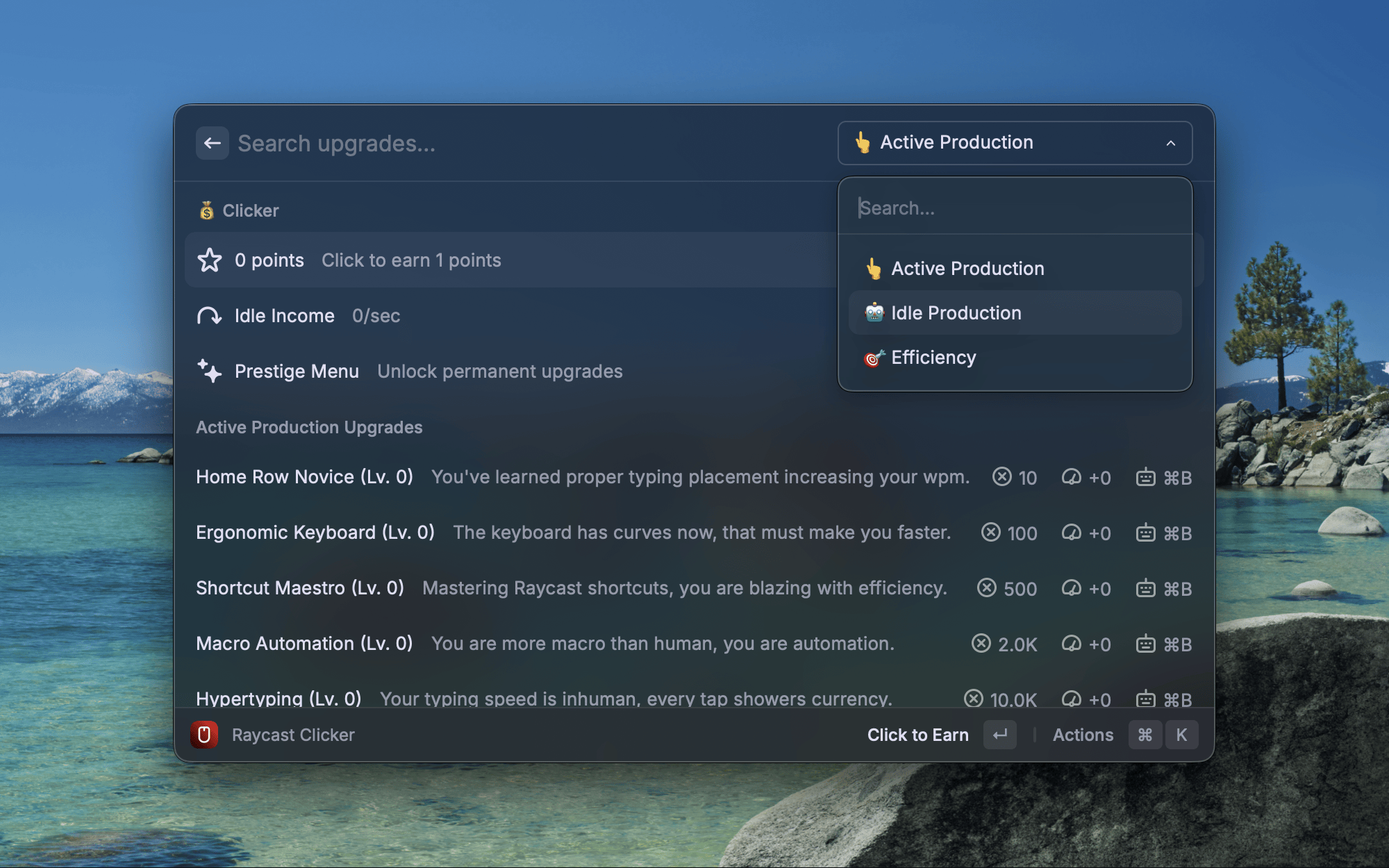
The core loop is click to earn, buy upgrades, unlock idle, prestige, repeat. There are three upgrade paths: Active for click power, Idle for auto-gain, and Efficiency for cost reduction. There are achievements, a random Golden Command event that gives you a burst of points, and a prestige system that previews your next boost before you reset.
Lessons from the village idiot
I built in Chrome. Raycast uses a 2018 version of WebKit. The bar chart looked like modern art after a blender accident.
Design with constraints, not against them. Raycast’s UI limits force clarity.
Version your saves early. Migration bugs are worse than game bugs.
Keep PRs small. Reviewers are doing you a favor; don’t drown them.
Per, litomore, and the Raycast crew made this project possible.
How to play!
- Available now in the Raycast Store → search for Ray Clicker.
- Raycast Store link
Closing thoughts
The game has 3,000 users. One emailed me saying they clicked during a funeral. I don’t know if I’m proud or horrified.
Windows port (in progress)
Raycast is coming to Windows, and I’m working on porting the game, especially since it’s out in beta. I just need to find the time between finals.
Thanks for reading!
If you are lucky, here is a free month of Pro. This code changes every so often: Raycast Pro Referral
Feel free to share this blog or reach out to me on LinkedIn.