1. Why Progress Bars Exist
I bricked a router waiting for a firmware update that hung at 99%. The bar wasn’t measuring completion. It was measuring my patience. That’s when I realized: progress bars are confidence games.
The progress bar was born in 1979 at Xerox PARC. It learned to lie around the time software started hanging at 99%.
That is the short version. The real story is longer and stranger. The idea was to show how close the user was to finishing the “Load,” whatever that may be. It became a tool to manage boredom, not just bandwidth.

2. The 99 Percent Problem
A famous example would be an installer progress bar. This is common in almost all installers, but often noticed in game installers and OS updates. They tend to show 0–100% markers and will sometimes hang on 99% simply because developers know users have invested too much time to cancel. This creates a sensation of movement designed primarily to prevent abandonment. So why lie? Because honesty feels broken. Progress bars are now often disconnected from the actual loading process, designed more to make the user feel like there is movement and incentives not to click off the page. A loading bar becomes almost a performance to keep you engaged, rather than a real indicator of progress. And it’s gotten worse, especially in AI, where model loading, streaming tokens, and queued inference make real progress hard to estimate. When ChatGPT shows “Thinking…” tokens streaming in, that’s a hybrid determinate/indeterminate indicator—you see activity but not completion percentage. AI model loading bars face the 99% problem with particular severity: loading a 100B parameter model can hang at that final percent for minutes.

3. Before Progress Indicators
3.1 Life Before Feedback
Before the time of the loading bar or others, if you submitted a batch job it would just be silent, operating correctly but with no indication. Early apps would just freeze while working in the background, with no way for the user to know if it was still operating. Before the era of SSDs, fast CPUs, and high-speed internet, apps would often seem as if they had crashed just waiting for the backend to catch up to the front end. If you were part of that era, or still use legacy software, you probably remember mashing keys in an attempt to make sure the software wasn’t hanging.
3.2 The Early Signals
After the era of frozen screens, we entered the static text era. When opening software or a website, you would be confronted with a “Loading” or “Please wait” with an ellipsis following. Primitive counters followed—simple loading bars based on operations completed. If you had a bunch of simple operations starting your app, like time check or other, then later in the app, have much larger tasks, the bar would jump in progress instead of moving steadily. While an improvement from the days of the frozen screen, they still only give slight insight into how the app is loading, but mainly to help make the user feel better about waiting.
4. The First Real Bar
4.1 Pre-Digital
To correctly tell the history of the progress bar, you must tell the story of the Gantt chart and earlier harmonograms. These acted as a pre-digital progress bar for factories and other projects.
4.2 The Start
In 1979, a man named Mitchell Model working at Xerox was tasked with improving the monitor system for the PARC. His big innovation was to add a graphical bar that was actually drawn to show progress behavior. Following in 1985, Brad Myers wrote a paper called “percent done progress indicators” in which he showed that progress bars reduce user anxiety even when the computer isn’t fast.
4.3 Why This Moment
This is the time when developers became more aware of the cost of loading and how it might affect the end users’ behavior. This is when they started to take steps to help alleviate the users’ dissatisfaction while increasing the time they were willing to wait for software to load.
5. From Bars to Spinners
This is the era where progress bars take one of two paths: Determinate or Indeterminate.
5.1 Determinate
A Determinate system has a real denominator (bytes, items, frames, etc.) so the percentage implies actual completion.
5.2 Indeterminate
An Indeterminate system is one that cannot estimate total work; it can only tell that something is in progress, like query planning, remote calls, or cache warm-up.
5.3 Spinners, Throbber, & Cursors

Early web icons such as Mosaic & Netscape used animated throbbers. Their logos were used as a simple indicator of progress by pulsing. Pulsing when loading & static when inactive. They would also use the OS cursor, when possible, to show loading progress. Such as the flipping hourglass icon, spinning pinwheel, or tiny circular blue spinner. A common trick is to have a simple Indeterminate spinner like an OS cursor, then change to a Determinate progress bar on the app to then show real progress to the user. Other apps will start with the Indeterminate then swap to a fake Determinate bar that will show a fake progress bar with a scripted percent sequence.
6. Why 99 Percent Never Ends (Under the Hood)
6.1 Why the First 90% Is Fast
For Indeterminate systems, it’s most likely trying to just keep you engaged and mimic the real thing. While the more interesting problem is for Determinate, the first 90% often is copying files, processing common cases, and straightforward I/O. The problems hit when it comes to verifying checksum, updating registries, cleaning up, & waiting for remote acknowledgments. These either include long computation or, worse, waiting for responses from servers.
6.2 The Lie of Estimation
Well, it’s not a complete lie; it is less of a lie and more of a statistical approximation. A lot of installers & updates approximate the total time from average machines or step counts. These are not meant to deceive but try to act as vague guides for how long an update or install takes. The two common ways to create a Determinate bar are to use a timer from the average time to install, or to use steps completed to move the bar based on the amount completed. While I imagine most of us assume the latter is the most common, it often leads to jumpy, almost random feeling progress on the bar. To help alleviate the uncertainty, they will combine the approach, giving the user an average install time total, along with the step counter to show percent completed. This can lead to being at 99% with the timer at zero but still not have all the operations completed for the install/update. Leveraging the sunk cost fallacy, users refuse to quit because they feel nearly finished; each extra minute of waiting makes it feel worse to abandon what seems to be an almost finished progress bar.
6.3 Tricks of The Trade
An honest progress bar would feel jittery with pauses, sometimes moving backwards. This would make the user feel like the bar was broken. So, this is where developers use a technique sometimes called “benevolent deception”; research from Harrison’s “Faster Progress Bars” and “Rethinking the progress bar” shows that easing curves and visual tricks make bars feel faster without changing duration.
I tried building an honest bar once. It showed a download dropping from 60% to 45% when a CDN node failed. Our support tickets spiked 400%. Users don’t want honesty. They want confidence. I learned to clamp backwards progress and hide the jitter.
Other tricks include moving quickly at the start when the user is the least invested, then slow towards the end when the user is invested. Another common trick is allocating more bar for predictable phases of the bar, so movement seems consistent. A must-have of a good progress bar is clamping backwards progress; this may make the bar hang on a number for longer, but backwards progress is more disruptive to the end user than longer on a single percent.
7. How Waiting Feels
7.1 Humans have a bad gauge of chronology.
We tend to be very perceptive to the now, while discounting past or future time. We overinflate the importance and duration of waiting in the present, especially if mentally unoccupied. If the user feels movement, if they’re mentally stimulated, the wait feels shorter—even when it isn’t. Myers proved this in ‘85: users preferred bars even when the computer wasn’t faster. They felt better about the system. Later, Harrison showed you could manipulate perceived time with easing curves. I used his paper to justify a bar that went backwards in my first startup. It failed. Users don’t read papers.
Research corner
Myers (1985) on percent-done indicators, Harrison et al. (2007) on rethinking progress bars, and Harrison, Yeo, Hudson (2010) on faster progress bars provide the key HCI evidence backing these perception effects.
7.2 Ethics of Perceived Performance
Manipulation in UX can serve users or exploit them. The difference lies in intent and outcome.
Good manipulation helps users tolerate necessary waits:
- Chunking: Step counts break a long wait into visible stages (“Uploading”, “Processing”, “Finalizing”) so users get multiple mini completions.
- Microcopy: Short labels explain what is happening, reducing “is it stuck” anxiety.
- Gentle motion: Subtle ribbing, pulsing, and non-hectic animation make time feel smoother.
Netflix, for example, loads the app behind its boot screen. By the time you see the UI, it’s ready.
Bad manipulation exploits users for engagement metrics:
- Fake stages purely to distract
- Bars that are mostly timers with no correlation to actual loading
- Time estimates that don’t even try to be accurate
In many cases, teams trade raw accuracy for perceived stability under real uncertainty, not just for engagement metrics.
8. Skeletons & Shimmers: The Modern Meta
8.1 Skeleton Screens
As the Internet and hardware have continued to speed up, expectations for load times have also increased. One innovation to improve the user loading experience is to load a skeleton screen of a webpage or app while the rest loads into place. This makes the user feel like the app has already started even if the content isn’t accessible.
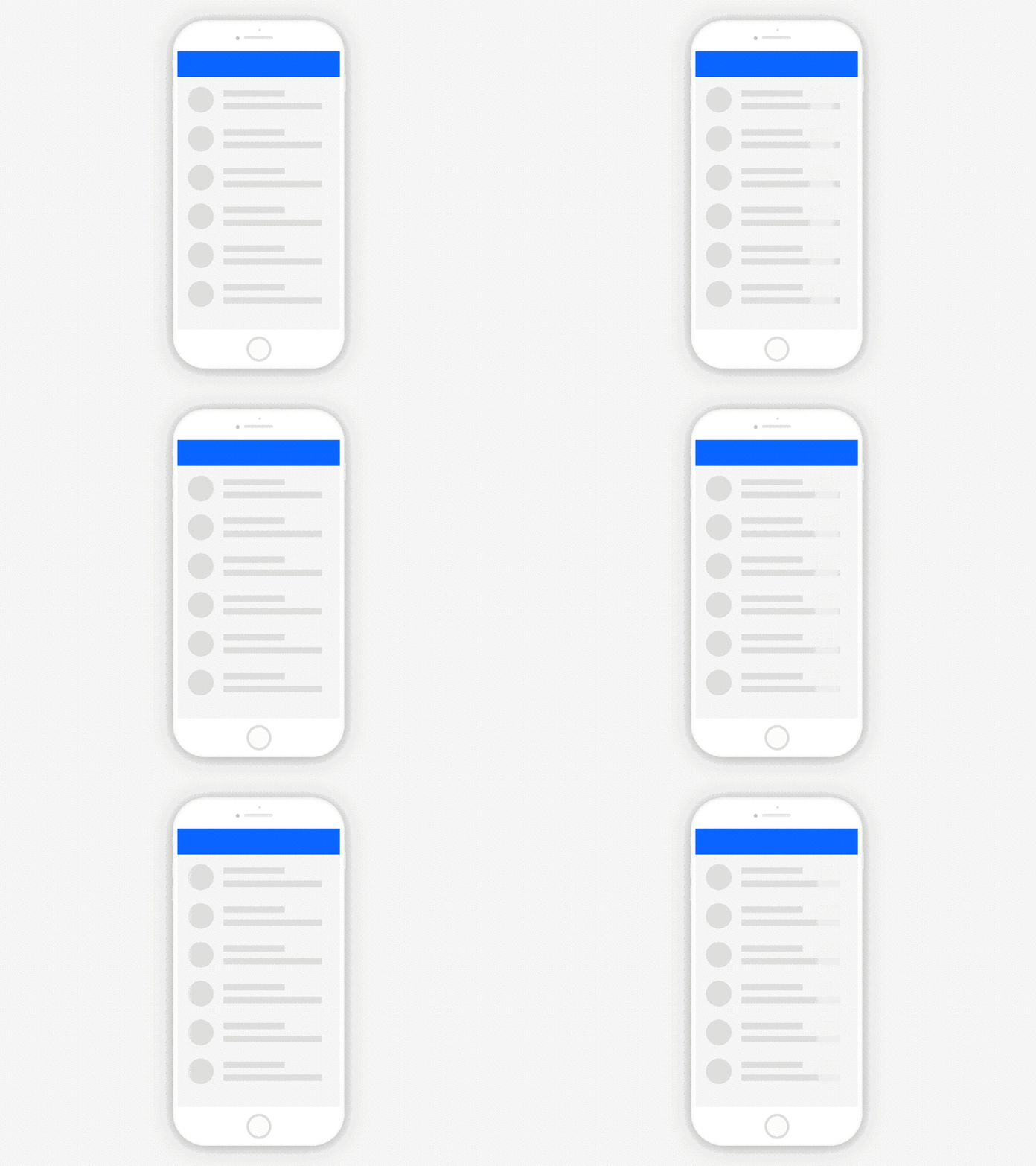
A shimmer animation accompanies the skeleton, showing the element is active. This, combined with a skeleton of the app/page, makes the user feel like the app is never stuck and so much progress has already been made that they can’t stop now. While skeletons with a shimmer have become the newest way to show loading, the simple progress bar still has its place for longer load times, such as uploading, downloading, or installing.
8.2 The Mobile World
Mobile killed the progress bar. Pull-to-refresh turned loading into a gesture. The feed killed “done.” Now infinite scroll trains users that progress is a lie.
Every app & web app has little circular progress rings around icons, often with a Determinate fill and an Indeterminate spinner combined. With the world moving towards a completely mobile first mindset, for many people, this is where they interact with progress indicators.
8.3 Infinite Scroll
We live in the age of the infinite scroll. Feeds replace “done” with “more below.” Progress moves from explicit bars to implicit motion: as long as new content appears, the app feels fast enough.

9. Ways to Use Progress Indicators
9.1 How to choose an Indicator
If you can, use a real Determinate percent bar when you have a stable denominator: bytes, items, frames. If those are not available & you must use an Indeterminate option, reach for spinners & skeletons with shimmers. Prefer honest native UI like the HTML <progress> element when it fits. This allows you to show the user the app isn’t frozen without having to lie about progress.
9.2 Keep the User Engaged
- Make sure to keep messages short, specific, & honest about what is happening.
- Avoid fake precision like “3 seconds left” unless you really know.
- Use easing and subtle animation to hide jitter, not to fabricate progress, while still showing the user progress.
- Also make sure not to make your load bar a center of attention; avoid aggressive flashing or high stress motion.
9.3 Trust & Ethics
If you are a user, it is easier to assume all progress bars are fake, so if you are a developer making one you may have an uphill battle to show the user that your app is being truthful. If you must block the UI, explain why and make it rare. When in doubt, favor slightly under promising over promising “about a minute remaining” that never is. Follow accessibility patterns like the ARIA progressbar role to keep the indicator perceivable.
10. Trust in the Line
Progress bars have always been in a strange place where the user knows they may not be truthful & the dev can’t always provide complete accuracy. But they have still become this weird social contract. They sit between noisy, probabilistic systems & humans who hate uncertainty. A good progress indicator respects uncertainty without disguising it. By the time a bar hits 99 percent, it is no longer measuring completion. It is measuring how much patience you have left.
The last time I trusted 99%, I lost a router. Now I design for the moment after—when the user realizes the bar is lying. Give them a way out.
Thanks for reading!
Jonathan Reed · LinkedIn
Citations
- Adamiecki, K. (1931). “Harmonogram.” Project Management Institute. PMI Library
- Gantt chart background. Wikipedia. Wikipedia: Gantt chart
- Mitchell Model, PARC memo (1979). Wikipedia: Progress bar. Wikipedia
- Myers, B. A. (1985). “Percent-done progress indicators.” CHI ‘85. ACM DL
- Harrison, C., et al. (2007). “Rethinking the progress bar.” UIST ‘07. ACM DL
- Harrison, C., Yeo, Z., Hudson, S. (2010). “Faster Progress Bars: Manipulating Perceived Duration.” CHI ‘10. Chris Harrison
- Browser throbbers. Wikipedia. Wikipedia
- Wroblewski, L. (2013). “Skeleton screens.” LukeW. LukeW
- Brichter, L. (2009). Pull-to-refresh (Tweetie). Wikipedia. Wikipedia
- HTML
<progress>element. MDN. MDN - ARIA progressbar role. MDN. MDN
- Hero Loading Bar, Data Loading, Activity Tracker, Buffering Meter, Completion Gauge PNG — PNGMART
- Determinate loading bar GIF — Wikimedia Commons
- Circular loading spinner GIF — Wikimedia Commons
- Skeleton screen loading GIF — Dribbble